
Essentials for YOOtheme Pro
Twitter Integration
The Twitter integration is available through Twitter Source. Use it to fetch tweets and user data from an authenticated Twitter/X account.
Twitter requires a custom Twitter/X developer app because ZOOlanders OAuth Apps are not supported for this provider. Create your own app, then use its Client ID, Client Secret, and Refresh Token with the Twitter Auth driver when configuring the Twitter Source.
Requires Technical Skills
This is a technical process that requires some development skills, such as interacting with REST APIs.
1. Create a New Developer App
Follow the official Twitter guide to select the plan that best fits your needs and create your Developer App.

TIP
The Free Tier does not provide read-access. To enable tweet reading capabilities, you must select a paid plan that includes this permission.
2. Enable OAuth 2.0 Authentication
Once created, navigate to the App Settings within the Projects Dashboard. Inside the settings view find the User authentication settings and enable OAuth 2.0 support.

Make sure to set the App Type as Native App, and input the required redirect URLs. Any valid URL will suffice.
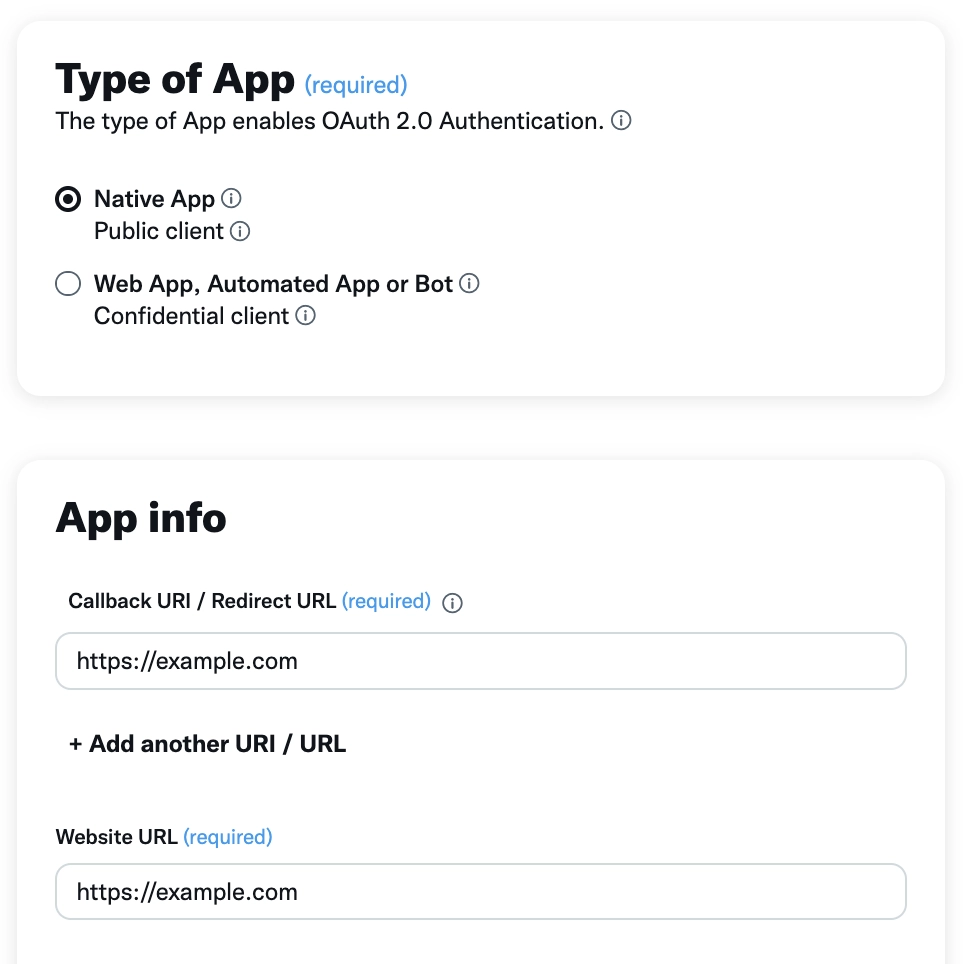
When prompted, store the generated Client ID and Client Secret safely.

3. Generate an Authorization URL
You can generate an authorization URL by copying and pasting the following template, replacing the placeholders with your own values:
text
https://twitter.com/i/oauth2/authorize
?response_type=code
&client_id=YOUR_APP_CLIENT_ID
&redirect_uri=https%3A%2F%2Fexample.com
&scope=tweet.read%20users.read%20offline.access
&state=state
&code_challenge=challenge
&code_challenge_method=plain
Make sure the redirect_uri parameter matches the redirect URL you set in your app settings. For further details review the official guide.
4. Authorize App
Visit the authorization URL in your browser, log in with your desired Twitter account and grant access. You will be redirected to the URL specified in the redirect_uri parameter. Ignore the page content and look at the URL in your browser's address bar. Copy the value of the code parameter -- you will need it in the next step.

5. Obtain a Refresh Token
Use a terminal or a tool like Postman to make a POST request and exchange the code for access and refresh tokens.
bash
curl --location --request POST 'https://api.twitter.com/2/oauth2/token' \
--header 'Content-Type: application/x-www-form-urlencoded' \
--data-urlencode 'code=THE_CODE_YOU_COPIED' \
--data-urlencode 'grant_type=authorization_code' \
--data-urlencode 'client_id=YOUR_APP_CLIENT_ID' \
--data-urlencode 'redirect_uri=https://example.com' \
--data-urlencode 'code_verifier=challenge'